Capturing Coastal Calm: The Instagram Feed Template - Beach
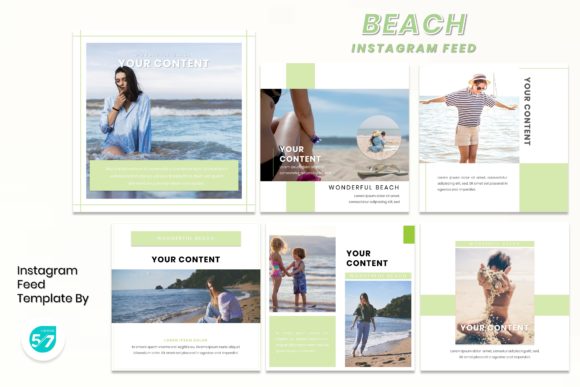
There’s a specific feeling you get when you scroll past a perfectly curated beach photo on Instagram—that sense of sun-warmed sand, the sound of gentle waves, and an instant mood shift. The Instagram Feed Template - Beach is designed to bottle that feeling and give your content a cohesive, professional aesthetic that resonates with audiences looking for calm, beauty, and escape. It’s more than just a set of slides; it’s a visual language for brands and creators who want to communicate warmth, relaxation, and a touch of elegance.
This template isn’t about loud, disruptive graphics. Its personality is in its subtlety—soft, natural color palettes, clean lines, and layouts that give your imagery and message plenty of breathing room. Think of it as the visual equivalent of a quiet morning walk along the shore. The style leans into modern, elegant design principles, avoiding clutter to let the core content shine. For a photographer, this means your images take center stage. For a business, it means your message is delivered with clarity and a serene confidence that builds trust.
Where This Template Truly Shines
While its name suggests a literal beach theme, the Instagram Feed Template - Beach is surprisingly versatile. Its true strength lies in its ability to evoke a mood rather than dictate a specific topic. This makes it a powerful tool across a wide spectrum of projects.
- Tourism & Hospitality: This is its most natural home. Hotels, resorts, travel bloggers, and tour operators can use it to showcase destinations, amenities, and experiences in a way that feels aspirational and authentic.
- Personal Branding & Lifestyle: Coaches, consultants, and influencers focused on wellness, mindfulness, or balanced living will find the template’s calm aesthetic aligns perfectly with their brand identity. It helps create a feed that feels like a sanctuary.
- Food & Beverage: Particularly for brands with a focus on organic, fresh, or coastal-inspired products. Think artisanal sea salt, tropical juices, or a beachside café. The clean layouts ensure your product photography looks appetizing and premium.
- Photography Portfolios: For photographers specializing in portraits, landscapes, or lifestyle shots, the template provides a consistent framework that enhances, rather than competes with, your work. It turns a feed into a curated gallery.
- Small Businesses & E-commerce: Any business aiming to project a relaxed, approachable, and high-quality image—from skincare brands to boutique clothing stores—can use these layouts to create social media graphics that feel professional and intentional.
The Practical Power of a Cohesive Feed
Using a template like this is a strategic move, not just an aesthetic one. Consistency is the cornerstone of recognition on social media. When your posts share a common visual thread—like the consistent use of the Instagram Feed Template - Beach layouts, color scheme, and typography—you create a brand identity that is instantly recognizable in a crowded feed. This builds familiarity and trust with your audience over time.
From a design perspective, the template enforces strong visual hierarchy. The master slide structure ensures that key elements like headlines, body text, and calls-to-action are placed for maximum readability and impact. This isn't about rigid rules; it's about having a proven foundation that guides the viewer's eye exactly where you want it to go, whether that's to a stunning photo, a compelling testimonial, or a product feature.
Moreover, the 1080x1080 pixel recommendation is a crucial, practical detail. It’s optimized for Instagram’s feed, ensuring your graphics appear crisp and professional without awkward cropping or blurry text. This attention to technical specs is what separates amateur-looking content from polished, professional material.
Implementing the Template with Confidence
Getting started is straightforward, but a thoughtful approach will yield the best results. The included PowerPoint .PPTX file and documentation are your starting point. Since all graphics are resizable and editable, you have the flexibility to adapt the template to your specific needs without starting from scratch.
Begin by evaluating the six slide layouts. Don’t just think about what you post today; consider your content strategy for the next month. Do you need more layouts for quotes, for multi-image carousels, or for featuring customer reviews? Map your content types to the available slides to ensure you have a plan for variety within the cohesive framework.
While the template uses recommended free web fonts, take a moment to test them with your actual copy. Readability is paramount. Ensure your headline font and body text font create a clear hierarchy and are easy to read at a glance on a mobile device. This is where understanding basic font pairing comes in—the template likely pairs a clean sans serif font for body text with a complementary display font for headlines, a classic combination for clarity and style.
Finally, remember that the demo images are placeholders. Your unique photography and graphics are what will bring the template to life. Use the picture placeholder feature to drag and drop your own visuals in, maintaining the template's balanced composition. This blend of a professional structure with your authentic content is what will make your feed truly stand out and connect with your audience.