DECIDE: A Clean, Modern Template for Business Growth
When you're putting together a presentation, the last thing you need is a cluttered template that fights against your message. You need something that feels intentional, polished, and—most importantly—easy to work with. That's exactly where the DECIDE Google Presentation Template comes in. It's built for professionals who want to look sharp without spending hours wrestling with formatting. Whether you're pitching a new client, walking your team through quarterly results, or presenting at a conference, this template gives you a solid foundation that respects your time and your brand.
What Makes DECIDE Stand Out Visually
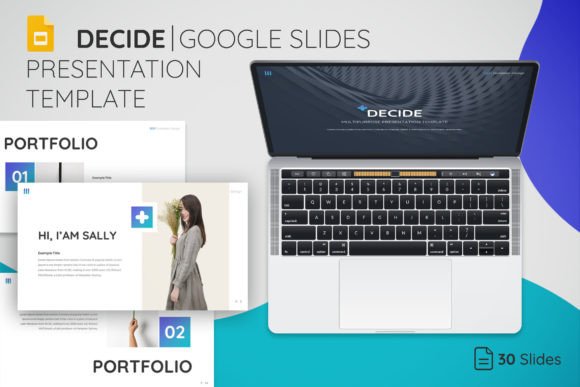
DECIDE has a clean, modern aesthetic that avoids the trap of being too trendy or too generic. The layouts use generous white space, balanced typography, and a visual rhythm that guides the viewer's eye naturally from one element to the next. It doesn't scream for attention—it earns it through clarity and structure. The overall personality is confident and professional, the kind of design that makes people trust what you're saying before they've even read a word. With 30 core slides and 150 slides total across multiple layouts, you get enough variety to keep your presentation visually engaging without it feeling inconsistent. The five color themes included give you flexibility to match your brand identity or adapt to different audiences. If you've ever struggled with making a presentation feel cohesive from start to finish, that built-in consistency is a real advantage.
Every element in the DECIDE Google Presentation Template is fully editable and resizable. That means you're not locked into someone else's design decisions. You can adjust the visual hierarchy, shift emphasis between text and imagery, and make the template genuinely yours. The drag-and-drop picture placeholders are straightforward—you drop in your photos and they fit the layout without awkward cropping or manual resizing. This is the kind of practical design thinking that separates a premium template from something you'd find for free and immediately regret downloading.
Where This Template Works Best
The versatility of DECIDE is one of its strongest qualities. Yes, it's built for business presentations, but that label covers a lot of ground. Entrepreneurs can use it for investor pitches and startup decks. Marketers will find it works well for campaign proposals, social media strategy presentations, and client reports. Small business owners can use it for internal meetings, sales decks, and partnership proposals. Designers and creative professionals might use it to present brand identity concepts, packaging design mockups, or editorial design proposals to clients.
Content creators and bloggers can adapt it for media kits, sponsorship proposals, or workshop materials. The template's modern typography and clean layouts make it suitable for industries ranging from tech and finance to health, education, and creative services. It doesn't impose a specific mood—it supports whatever message you bring to it. That neutrality is actually a strength. A template that's too opinionated in its design limits who can use it effectively. DECIDE avoids that problem by staying balanced and adaptable.
How a Thoughtful Template Influences Your Audience
There's a reason design professionals obsess over visual hierarchy and readability. When someone is watching a presentation, they're processing information in real time. If your slides are cluttered, if the typography is inconsistent, or if the layout doesn't guide their attention, they lose the thread of your argument. DECIDE is built on master slides, which means every layout follows the same underlying structure. That consistency creates a sense of professionalism that audiences pick up on, even if they can't articulate why. It signals that you've put thought into how you communicate, which builds trust.
The template also handles the balance between text and visuals well. Too many presentations lean too far in one direction—either walls of text or slides that are all image and no substance. DECIDE gives you layouts that support both, letting you choose the right slide for the right moment. A data-heavy slide has different spatial needs than a quote slide or a team introduction, and having dedicated layouts for each purpose means you're not forcing content into formats that don't serve it.
Getting the Most Out of the Template
The included files are straightforward: PPTX files for direct editing, an icon library for adding visual elements without hunting for graphics elsewhere, and a Read Me document that covers font links and setup details. The free fonts used in the template are a practical touch—no surprise licensing costs, no need to purchase additional typefaces before you can start working. That's a real consideration for small business owners and freelancers who need to manage their design budget carefully.
When you open the template, take a few minutes to explore the slide master before you start editing individual slides. The master slides control the global formatting, so if you want to change a color scheme or adjust font sizes across the entire presentation, that's where you do it. It saves significant time compared to editing slides one by one. The icon library is worth browsing early too—knowing what's available helps you make better layout decisions as you build out your content.
One practical recommendation: before you commit to DECIDE for a specific project, look through all 150 slides and identify the layouts that match your content needs. Not every presentation needs every slide type. Planning your structure first and then selecting the right layouts keeps your deck focused and prevents the common mistake of including slides just because they exist. The template is a tool, and like any good design asset, it works best when you use it with intention.
The DECIDE Google Presentation Template isn't trying to be everything. It's trying to be a reliable, professional starting point that lets you focus on your message instead of fighting with formatting. For anyone who presents regularly—whether to clients, teams, investors, or audiences—that kind of reliability is worth more than any flashy design feature.