Google Slides - Apollo: A Design Asset for Modern Presentations
When you're building a brand, a pitch, or a creative portfolio, the tools you choose say as much about you as the content itself. A presentation template isn't just a collection of slides; it's the stage for your ideas. The Apollo Wellness Google Slides Template is designed with this principle in mind. It offers a clean, professional, and highly adaptable foundation for anyone from a startup founder to a freelance photographer, aiming to communicate with clarity and visual confidence.
Understanding the Visual Language of Apollo
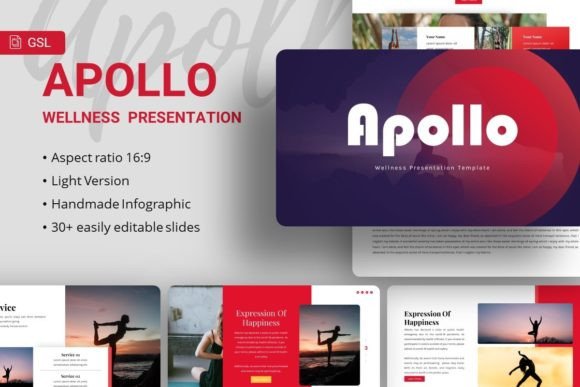
Apollo presents a balanced and contemporary aesthetic. It leans into a minimalist sensibility without feeling cold or sterile. The design language is built on strong visual hierarchy, ample white space, and a disciplined use of color and typography. This isn't a template that shouts for attention with flashy effects; instead, it commands respect through structure and elegance. The personality is one of professionalism, trustworthiness, and modern sophistication. It feels equally at home presenting a quarterly business review as it does showcasing a wellness brand's new product line.
The overall appeal lies in its versatility and polish. The handcrafted infographics and pixel-perfect illustrations are not mere decorations. They are functional elements designed to make complex data digestible and to give visual weight to key points. This focus on utility over ornamentation is what makes it a valuable design asset. The template understands that a great presentation guides the audience's eye, and every element is placed with that goal in mind.
Where This Template Finds Its Strength
The true test of a premium font or template is its range. Apollo is engineered for broad application. For a creative agency or company profile, it provides the structured professionalism clients expect. The clean layouts make financials, timelines, and team bios easy to scan. For a startup or pitch deck, the template’s strong visual hierarchy helps tell a compelling story, directing investor attention to the metrics and milestones that matter most.
Its utility extends into the personal and creative spheres. A photography portfolio benefits immensely from the minimalist backdrop, which lets the images become the hero. The same applies for artists or designers showcasing their work. Even for personal use, like a hobbyist presenting a community project or a small business owner outlining a new service, Apollo offers a level of polish that elevates the message. It’s a tool for brand identity development, helping to maintain consistency from the first slide to the last.
The Mechanics of a Professional Presentation
A presentation’s effectiveness hinges on more than just good content; it’s about how that content is received. The typeface choices within Apollo, such as Playfair Display and Karla, are not arbitrary. Playfair Display, a serif font, brings a touch of classic elegance and authority, ideal for headings and key statements. Karla, a clean sans serif font, ensures body text remains highly readable on screens of all sizes. This thoughtful font pairing creates a natural rhythm and visual hierarchy, making your information easier to follow and remember.
This attention to typographic detail directly influences brand perception. Consistent use of these design assets across your slides builds a sense of professionalism and recognition. It tells your audience that you care about the details, which in turn builds trust. The template’s structure also aids audience engagement. Well-placed infographics break up text, and picture placeholders with drag-and-drop functionality allow you to integrate your own visuals seamlessly, making the presentation feel uniquely yours.
Practical Guidance for Using Apollo
Choosing a template like Apollo is the first step. Using it effectively is the next. Start by evaluating its fit for your specific project. Does the color palette align with your existing brand identity? If not, the easy customization features allow you to adapt it. The master slides are the backbone of the template; editing them ensures changes propagate consistently throughout your deck.
Don’t overlook the included documentation and vector icons. These are practical resources designed to save you time. The icons, in particular, can add visual interest and help illustrate points without relying solely on stock imagery. When incorporating your own photos, leverage the picture placeholders. They are designed to maintain the template’s balanced composition, even when you swap in your own content.
Finally, consider the flow. A presentation is a narrative. Use Apollo’s structured slides to build your story logically. The variety of slide layouts—from title slides to quote slides to data-driven charts—gives you the tools to pace your presentation effectively. Whether you’re delivering a startup pitch, a corporate update, or a personal portfolio review, the goal is the same: to communicate your idea with maximum clarity and impact. The Apollo template is built to be the reliable, professional framework that lets your content do the talking.