Spooky Season Marketing Made Simple: The Instagram Carousel Powerpoint Template
Halloween is one of the most visually rich times of the year, and for businesses, it represents a massive opportunity to engage with audiences. However, creating fresh, high-quality content for social media can be time-consuming. If you are looking for a way to produce professional social media graphics without spending hours in complex design software, the Instagram Carousel - Happy Halloween template offers a streamlined solution. This isn't just a set of static images; it is a structured Powerpoint template designed to help you tell a story across multiple slides, keeping your audience swiping and engaged.
Visual Style and Modern Appeal
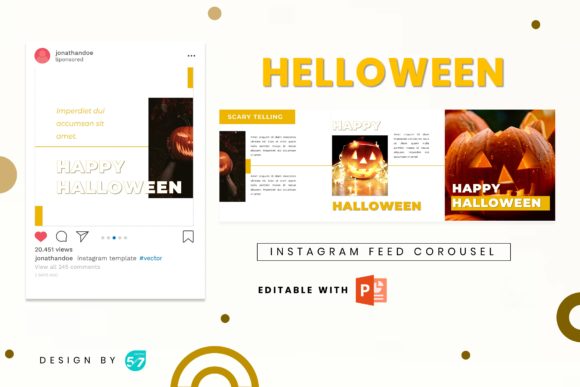
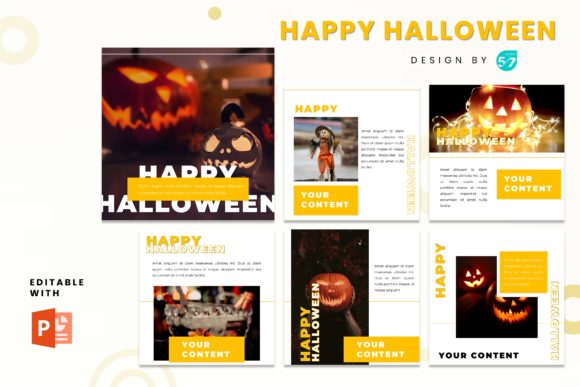
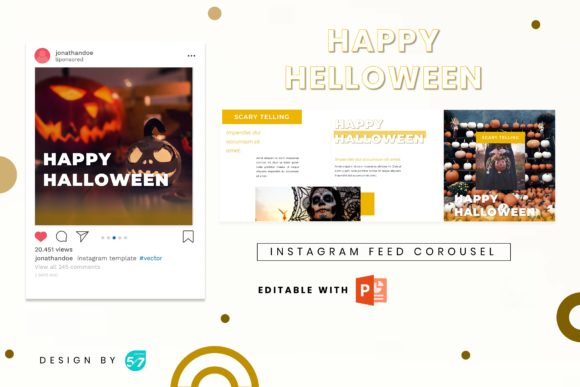
The first thing you notice about this template is its modern typography and clean layout. It moves away from the cluttered, overly cartoonish styles often associated with Halloween marketing. Instead, it embraces a professional and elegant aesthetic. The design uses a standard 1080x1080 pixel grid, which is the gold standard for Instagram posts. This ensures your content looks crisp and fits perfectly in the feed without awkward cropping.
The layout is divided into four distinct parts within a single slide system, effectively creating a four-page carousel. This structure is perfect for visual hierarchy. You can introduce a concept on the first panel, expand on it with details in the middle, and finish with a strong call to action on the final slide. Because the graphics are resizable and editable, you have total control over the brand identity. You aren't locked into a specific color palette; you can adjust the elements to match your specific brand guidelines, whether you are a high-end fashion boutique or a cozy local café.
Practical Applications for Your Business
The versatility of the Instagram Carousel - Happy Halloween template is one of its strongest assets. It serves as a robust foundation for various industries. Here is how different sectors can leverage this design asset:
- Retail and Fashion: Use the carousel to showcase a "Spooky Style" collection. The picture placeholder feature allows you to simply drag and drop your product photos into the designated areas. You can highlight specific items like accessories or autumn wear without needing to manually resize images every time.
- Food and Beverage: Restaurants and cafes can use this to promote a seasonal menu. Imagine a slide featuring a pumpkin spice latte, followed by a slide of a themed pastry, and ending with your operating hours for Halloween night. The clean layout ensures the food photography remains the hero.
- Events and Parties: If you are hosting a costume party or a community event, the carousel format is ideal for an invitation. The first slide acts as the bold announcement, the middle slides can detail the DJs or activities, and the final slide provides the location and ticket link.
- General Business: Even if your business isn't directly related to Halloween, you can use this to show a fun side. A marketing agency or a tech startup could use the creative font combinations included to share "5 Scary Good Marketing Tips" or "Don't Let Your Data Ghost You."
Design Efficiency and Customization
One of the biggest hurdles for small business owners and content creators is the technical barrier of design tools. This template eliminates that friction. By utilizing PowerPoint—a tool most people already have installed on their computers—it democratizes the design process. You do not need a subscription to expensive creative cloud software to produce premium font driven designs.
The inclusion of free web fonts is a practical touch. It means you won't need to purchase expensive licenses to replicate the look of the demo. The typography choices included in the file are selected to ensure readability. Good font pairing is essential for visual hierarchy. The template likely balances a display font for headers with a legible sans serif font or serif font for body text, ensuring that your message is communicated clearly even on small mobile screens.
Steps to Get Started
- Open and Edit: Open the .PPTX file. You will see the master slides. Simply click on the text boxes to change the copy to fit your offer.
- Drag and Drop: Locate the image placeholders. Drag your high-resolution photos from your desktop directly into the shapes. The software will automatically crop them to fit the design.
- Export for Web: Once you are happy with the design, go to File > Save As. Select PNG or JPG. This is crucial because exporting as an image locks in the font rendering, ensuring it looks the same on your audience's phone as it does on your screen.
Enhancing Brand Perception
Using a structured template like this does more than just save time; it builds brand consistency. When your audience sees a well-designed, cohesive carousel, it signals professionalism. It suggests that your business is active, attentive to detail, and modern. In the crowded space of social media, these subtle cues influence how potential customers perceive your value.
Furthermore, the carousel format itself boosts engagement metrics. Instagram's algorithm tends to favor content that keeps users on the platform longer. By encouraging users to swipe through four slides, you are increasing the "dwell time" on your post, which can help amplify your reach.
Ultimately, the Instagram Carousel - Happy Halloween template is a practical tool for seasonal marketing. It combines modern typography with user-friendly functionality, allowing you to create professional content that stands out. Whether you are promoting a sale, an event, or just engaging with your community, this asset provides the structure you need to execute your vision effectively.