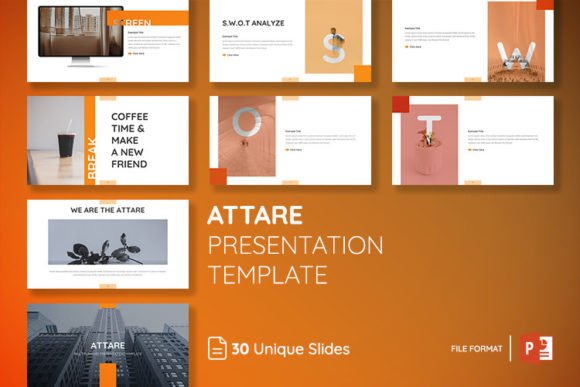
ATTARE Powerpoint Presentation Template: Streamline Your Business
In the world of business strategy, the visual aid is often just as important as the speech itself. We have all sat through presentations that were cluttered, confusing, or visually stale. The ATTARE Powerpoint Presentation Template moves away from those frustrations, offering a solution that prioritizes clarity and modern aesthetics. It is not just a collection of slides; it is a tool designed to bring your company to the next level by ensuring your visual data supports your narrative rather than distracting from it. When you open the file, the immediate impression is one of professionalism. The design language is clean, utilizing plenty of white space and structured grids that make information digestible.
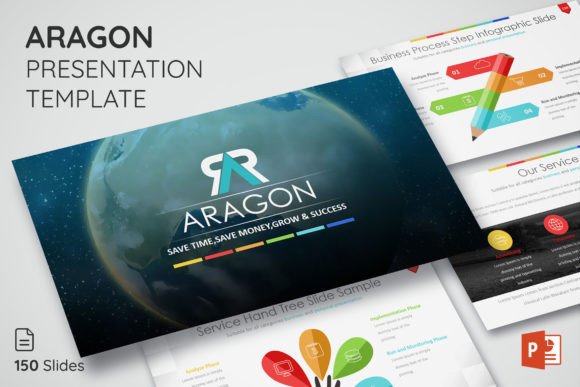
One of the most practical aspects of working with the ATTARE Powerpoint Presentation Template is the sheer volume of options provided without overwhelming the user. You have access to 150 slides total, organized within distinct layout categories. This variety is crucial because no two business meetings are the same. Whether you are presenting a quarterly financial review, launching a new product, or pitching to investors, having a diverse toolkit allows you to maintain visual consistency while addressing different content needs. The inclusion of 5 themes color further extends this versatility. You can switch from a corporate blue to a vibrant creative palette in seconds, ensuring the template aligns with the specific mood of your presentation or your brand's existing color identity.
Design Flexibility and Master Slides
For designers and entrepreneurs alike, the technical structure of a presentation template is just as important as its visual appeal. The ATTARE Powerpoint Presentation Template is built on layouts based on master slides. This is a critical feature for anyone serious about efficiency. Instead of manually adjusting fonts or moving logo placeholders on every single page, changes made to the master slide automatically cascade throughout the entire project. This ensures that your brand identity remains consistent across all 150 slides. It eliminates the "drift" that happens when you manually edit large documents, where font sizes or margins slowly become inconsistent.
Furthermore, the workflow is designed to be intuitive. The template utilizes a drag and drop interface for images, which is a massive time-saver. You do not need to be a technical wizard to replace the placeholder images with your own high-quality photography. The elements are fully editable and resizable, meaning you can adapt the graphic design assets to fit your specific data. If a chart is too small, scale it up. If a text block needs more breathing room, adjust the container. This level of control allows you to treat the presentation not as a rigid form to fill out, but as a flexible canvas for your ideas.
Visual Style and Practical Application
The aesthetic of the ATTARE Powerpoint Presentation Template leans heavily into modern typography and geometric balance. It avoids the dated "clip art" look of older templates in favor of sharp lines and contemporary iconography. This makes it an excellent choice for a wide range of industries, from tech startups to established corporate firms. The visual hierarchy is clear: headings stand out, body text is legible, and data visualization elements are distinct. This clarity is vital for audience engagement. When your slides are easy to read, your audience spends less time squinting at the screen and more time listening to your message.
While designed primarily for business presentations, the multipurpose nature of the file allows for creative application. Marketers can use it to build social media content calendars or campaign reports. Educators can adapt the layouts for course materials. The clean and modern style acts as a neutral yet sophisticated backdrop for almost any content type. Because the template includes a robust Icon Library, you have immediate access to visual metaphors that can help explain complex concepts without relying on stock photos. This integration of icons and slide layouts saves significant time during the design phase.
Customization and Included Assets
Getting started with the ATTARE Powerpoint Presentation Template is straightforward, thanks to the included resources. The package comes with PPTX Files, the Icon Library, and a Read Me Documentation file. The documentation is particularly helpful as it contains links to the free font used in the design preview. Using the recommended font ensures that the typography looks exactly as intended, preserving the kerning and leading that the designer optimized. However, because the text is editable, you can also substitute your own brand fonts if required.
It is important to note that the photo not include disclaimer is standard for templates of this nature, and in many ways, it is a benefit. Stock photos included in templates are often generic. By allowing you to insert your own images, the ATTARE Powerpoint Presentation Template encourages you to create a presentation that feels authentic to your brand. The drag-and-drop functionality makes this process seamless. Whether you are preparing a keynote speech or a internal workshop, the ability to quickly swap visuals and edit text ensures that you can meet tight deadlines without sacrificing quality.
Conclusion: Efficiency Meets Professionalism
Ultimately, the value of the ATTARE Powerpoint Presentation Template lies in its ability to save time while elevating the perceived quality of your work. For small business owners and content creators, time is a finite resource. Spending hours trying to align boxes or fix formatting issues is unproductive. By providing a structured, highly editable framework, this template allows you to focus on what matters: your content and your delivery. It is a practical investment for anyone who regularly communicates ideas visually, ensuring that your next presentation is not only heard but also remembered for its professionalism and clarity.