DORCA Google Slide Presentation Template: Clean, Modern Design
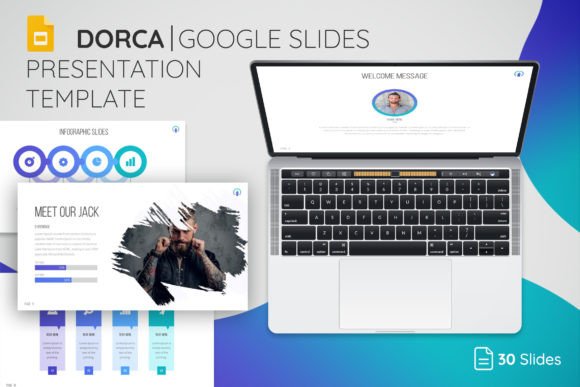
Creating a presentation that looks polished and professional shouldn't require a design degree or hours of fiddling with layouts. The DORCA Google Slide Presentation Template is built for people who need to communicate ideas clearly and look good doing it. It's a clean, modern template designed primarily for business presentations, but its versatility extends to pitches, reports, educational content, and creative portfolios. If you've ever stared at a blank slide deck wondering where to start, this template removes that friction entirely.
What Makes DORCA Stand Out
The visual personality of the DORCA Google Slide Presentation Template is rooted in clarity. It uses generous white space, balanced typography, and structured layouts that guide the viewer's eye naturally from one element to the next. There's nothing cluttered or overly decorative here. The design feels contemporary without being trendy in a way that will date quickly. Color palettes are restrained and intentional, which means your content stays front and center rather than competing with flashy backgrounds or ornamental graphics.
With 30 core slides and 150 total slides spread across five color themes, the template gives you genuine flexibility. You're not locked into a single aesthetic. Whether you're presenting quarterly results to stakeholders or pitching a new product concept to investors, you can find a slide configuration that fits the tone. The five theme colors let you adapt the visual mood without redesigning anything from scratch. That kind of adaptability matters when you're working across different clients, audiences, or brand guidelines.
Practical Features That Save Real Time
One of the most useful aspects of the DORCA Google Slide Presentation Template is how everything is built on master slides. This means layouts stay consistent across your entire deck. Change a font size on the master, and every instance updates. Swap a color, and the whole presentation shifts. For anyone who's spent an afternoon manually adjusting individual slides, this alone is worth the investment.
The drag-and-drop picture placeholders are another time-saver. You don't need to resize, crop, or reposition images manually. Drop your photo in, and it fits the designated space. All elements are fully editable and resizable, so you can adjust proportions, move text boxes, or rework layouts to suit your specific content. The template also includes an icon library, which is genuinely helpful for adding visual cues to data-heavy slides or breaking up long blocks of text.
Fonts are often a hidden cost in design templates. DORCA uses free fonts, and the included Read Me documentation provides direct links so you can download and install them without hunting around. That small detail prevents the frustrating situation where you open a template and half the text looks wrong because you're missing a typeface.
Where This Template Works Best
Business presentations are the obvious starting point, but the DORCA Google Slide Presentation Template stretches further than that. Marketing teams can use it for campaign briefs and strategy decks. Entrepreneurs can build investor pitch decks that feel credible and well-structured. Educators and trainers can create workshop materials that hold attention. Bloggers and content creators can adapt slides for webinar visuals or social media carousels.
Small business owners often don't have access to a dedicated designer. This template bridges that gap. It gives you a professional framework so your ideas come across with the visual authority they deserve. Brand consistency is easier to maintain when your presentation materials match the quality of your products or services. A sloppy deck can undermine an otherwise strong pitch. DORCA helps you avoid that problem without requiring advanced design skills.
The template also works well for personal projects. If you're putting together a portfolio review, a community workshop, or even a family event slideshow, the clean layouts adapt gracefully. The modern typography and balanced composition give everything a polished feel regardless of the subject matter.
Getting the Most Out of Your Template
Before you start building your deck, take a few minutes to browse all 150 slides. Familiarize yourself with the range of layouts available. You'll find title slides, content slides with various column arrangements, data visualization layouts, image-heavy slides, and closing slides. Knowing what's available prevents you from forcing content into a layout that doesn't quite fit.
Choose your color theme early. Each of the five options sets a different visual tone. Pick the one that aligns closest with your brand or the mood of your presentation. You can always adjust individual elements later, but starting with the right theme saves significant editing time.
When adding images, use high-quality photos. The drag-and-drop feature works beautifully, but it can't compensate for blurry or poorly composed source images. Consistent image quality across your deck makes a noticeable difference in how professional the final result feels.
The icon library included in the package is worth exploring thoroughly. Icons can replace bullet points, illustrate processes, or add visual interest to data slides. They're a small touch that elevates the overall design without adding complexity.
A Template Built for Real Workflows
The DORCA Google Slide Presentation Template is designed with actual working habits in mind. Everything in the package is highly editable, from the PPTX files to the icons to the documentation. You're not buying a static design you can barely modify. You're getting a flexible toolkit that adapts to whatever presentation challenge you're facing next.
For designers working with clients, the template provides a solid starting point that can be customized to match specific brand identities. For entrepreneurs and small business owners, it offers a shortcut to professional-quality presentations without outsourcing. For marketers and content creators, it's a reliable resource for building visual content that communicates clearly and looks consistently polished.
Good presentations don't happen by accident. They happen when thoughtful design meets clear content. The DORCA Google Slide Presentation Template handles the design side so you can focus entirely on what you want to say. That's the real value here. Not flashy effects or complicated animations, but a clean, modern framework that lets your ideas do the work.