Rizov – Pitch Deck Google Slides: A Modern Template for Your Next Presentation
A Versatile Foundation for Any Pitch
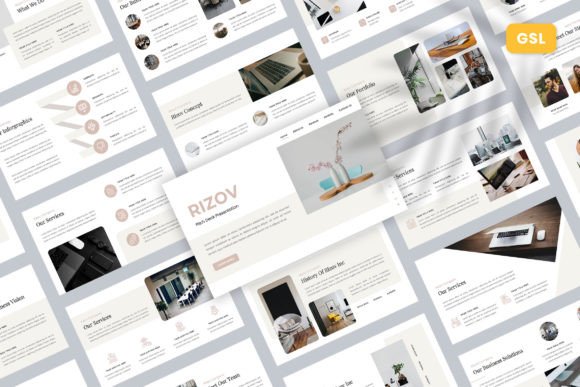
When you’re preparing to present your startup, agency, or portfolio, the slide deck often feels like a secondary concern—until it isn’t. A disjointed template can distract from your message, while a cohesive one elevates it. The Rizov – Pitch Deck Google Slides template is designed to be that cohesive foundation. It’s not just a collection of slides; it’s a structured visual system built for clarity and impact. With 30 fully editable slides, it provides a comprehensive framework that adapts to your content, whether you're outlining a business model, showcasing a creative portfolio, or pitching a new product to investors.
What immediately stands out about Rizov is its clean, contemporary aesthetic. The design personality strikes a balance between professional and approachable. It avoids overly complex animations or flashy transitions that can feel gimmicky in a business context. Instead, it relies on strong visual hierarchy, ample white space, and a modern typography palette to guide the viewer's eye. The overall appeal is one of focused professionalism—it looks serious without being sterile, and creative without being chaotic. This makes it an excellent starting point for a wide range of audiences, from a tech startup seeking venture capital to a photographer presenting a new series to a gallery.
Designed for Real-World Use and Customization
Practicality is where a template truly proves its worth. Rizov is built on master slides, a critical feature for anyone who values efficiency and consistency. This means you can change a color scheme, update a font, or adjust a layout element in one place, and the change will cascade throughout the entire presentation. For entrepreneurs and small business owners juggling multiple tasks, this saves a tremendous amount of time and reduces the risk of inconsistencies slipping through.
The template’s flexibility is another key strength. It’s marketed for uses like Company Profile, Creative Agency, and Portfolio, and it genuinely delivers on that promise. The slide layouts include a thoughtful mix of text-heavy frames, image placeholders, data visualization charts, team profiles, and timeline graphics. This mix allows you to tell a complete story. For instance, a marketing agency could use the "Problem" and "Solution" slides to frame a client challenge, followed by "Our Process" and "Case Study" slides to build credibility. The drag-and-drop picture placeholders are a simple but essential feature, making it easy to integrate your own photography or brand imagery without wrestling with alignment and sizing.
Choosing and Implementing Rizov for Your Brand
Integrating a template like Rizov into your workflow is straightforward, but a few best practices can maximize its effectiveness. First, consider your brand’s existing visual identity. The template uses recommended free web fonts, which is a huge plus for accessibility and cost. Before you start, download those specific typefaces to ensure everything renders correctly. You can then evaluate whether those fonts align with your brand’s voice. The template’s default style is likely a clean sans serif or a modern serif font pairing, which works well for most business and creative contexts.
Customization is key to making the template your own. Start by applying your brand’s color palette to the master slides. This single step transforms the template from a generic framework into a branded asset. Next, focus on imagery. The demo images are placeholders, so invest time in selecting high-quality, relevant photos or graphics that reflect your project’s tone. Consistent image treatment—whether it’s a uniform filter, color grade, or cropping style—will add a layer of polish that speaks to your attention to detail.
Finally, think about font pairing and visual hierarchy. While the template provides a strong typographic system, you may need to adjust it. If you’re presenting a highly technical business plan, you might want to emphasize clarity with a straightforward sans serif font for body text. If you’re a designer showcasing creative work, you might introduce a subtle display font or script font for accent text on title slides to inject more personality. The key is to maintain readability above all else. Ensure your body text has sufficient contrast and size, and use the template’s built-in hierarchy—headings, subheads, and body text—to create a natural flow for your audience to follow.
Beyond the Pitch: Expanding the Template's Utility
While its name suggests a specific use, the Rizov template’s structure makes it valuable beyond investor pitches. Its clean layout and organized sections are perfect for internal company presentations, quarterly business reviews, or detailed project proposals. Educators and trainers can adapt it for workshop materials, using the slide variety to break up content with engaging visuals and clear takeaways.
For those in publishing or content creation, the template can be reimagined as a media kit or a portfolio showcase for potential clients or collaborators. The ability to easily edit graphics and text means you can tailor it to different audiences without starting from scratch each time. This adaptability is what separates a good template from a great one—it becomes a reusable design asset in your toolkit, not just a one-time download.
In the end, a presentation template is a tool for communication. Rizov – Pitch Deck Google Slides provides a professional, adaptable, and user-friendly framework that helps you focus on your message. By leveraging its master slides, thoughtful layouts, and easy customization, you can create presentations that not only look polished but also effectively convey your ideas, whether you're in a boardroom, a creative studio, or a virtual meeting.