Entercorp-Google Slides: Your Template for Corporate Impact
Creating a presentation that feels both professional and engaging is a common challenge. You need a structure that conveys credibility without sacrificing visual interest. The Entercorp-Corporate Business Google Slides Template is designed to solve that exact problem. It’s a versatile tool built for clarity, making it ideal for everything from a startup pitch deck to a detailed company profile. This isn't just another set of slides; it's a foundation for your brand identity in a presentation format.
A Design That Speaks Your Professional Language
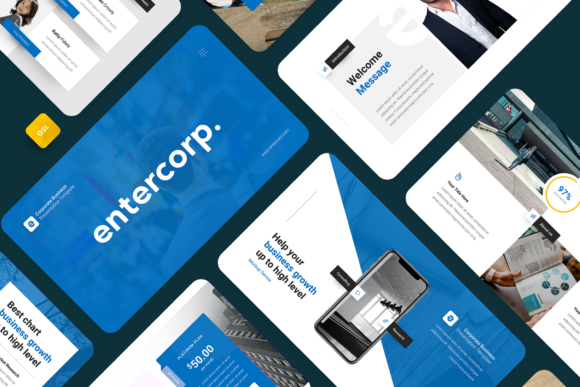
The visual personality of Entercorp is clean, modern, and authoritative. It uses a balanced layout that guides the viewer's eye naturally, creating a strong visual hierarchy. The template leverages a mix of serif and sans serif font styles for headings and body text, a classic pairing that enhances readability and conveys a sense of established professionalism. The color palette is corporate-friendly yet contemporary, avoiding stark whites for softer, more approachable tones that work across industries.
What makes it practical is its flexibility. Every graphic element is resizable and customizable. The picture placeholder feature is a standout; you simply drag and drop your images into pre-defined spaces. This saves immense time and ensures your images are perfectly framed and proportioned. Whether you're showcasing a portfolio, outlining a marketing strategy, or presenting financial data, the layout adapts to your content, not the other way around.
Where This Template Truly Shines
Think of Entercorp as a design asset that elevates your communication. For a creative agency or designer, it provides a sophisticated canvas to present work, making case studies look polished. Entrepreneurs and startup founders can use it to craft a compelling pitch deck that investors will take seriously. The structured slides help build a narrative that moves logically from problem to solution to business model.
For marketers and bloggers, it transforms reports and campaign summaries into engaging visual stories. A publisher could use it to present a book proposal or a seasonal catalog. Even for personal portfolio purposes, the template offers a more dynamic alternative to a static PDF, allowing you to walk a potential client or employer through your journey interactively. The 16:9 widescreen ratio is standard for modern displays and projectors, ensuring your presentation looks sharp everywhere.
Making It Work for Your Project
Getting started is straightforward. The template includes a Google Slides .PPTX file and a documentation file to guide you. Since it's based on Master Slides, you can make global changes to fonts and colors from one central place, ensuring consistency throughout your deck. This is crucial for maintaining a professional brand identity.
Here’s a practical tip: before you dive into editing, outline your key messages. The 36 slides offer ample space, but the best presentations are focused. Choose the slides that support your story. The free web fonts used and recommended are readily available, so you won't need to purchase additional licenses to maintain the intended look. Test your final presentation on a few different devices to check for any layout quirks, though the 16:9 ratio is quite robust.
Ultimately, the value of a tool like Entercorp lies in its ability to make you look prepared and polished. It handles the heavy lifting of design, allowing you to focus on your message. For any professional in the adult 20–50 age range—from content creators to small business owners—this template is a practical investment in how your ideas are perceived. It turns the task of building a presentation from a design chore into a strategic exercise in communication.